No Software Installation
APLDownloader works fully online, so there is no need to install apps, music converters, or desktop software.
PC
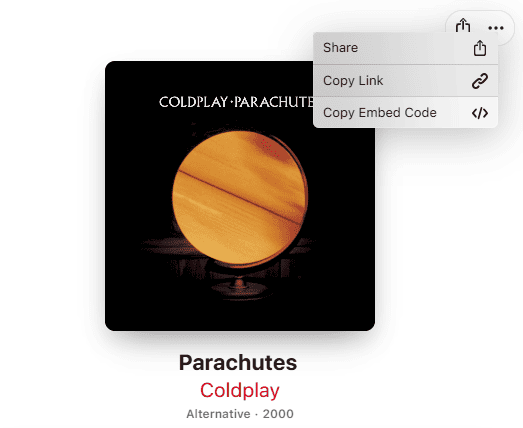
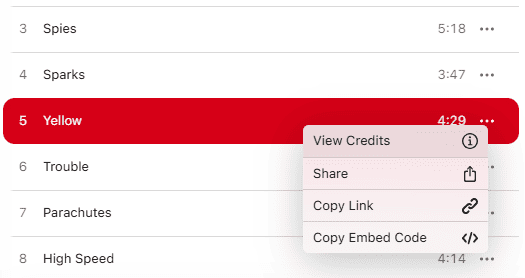
Open Apple Music in your browser or desktop app, click the three dots menu, choose Share, and copy the song or playlist link.
Android / iPhone
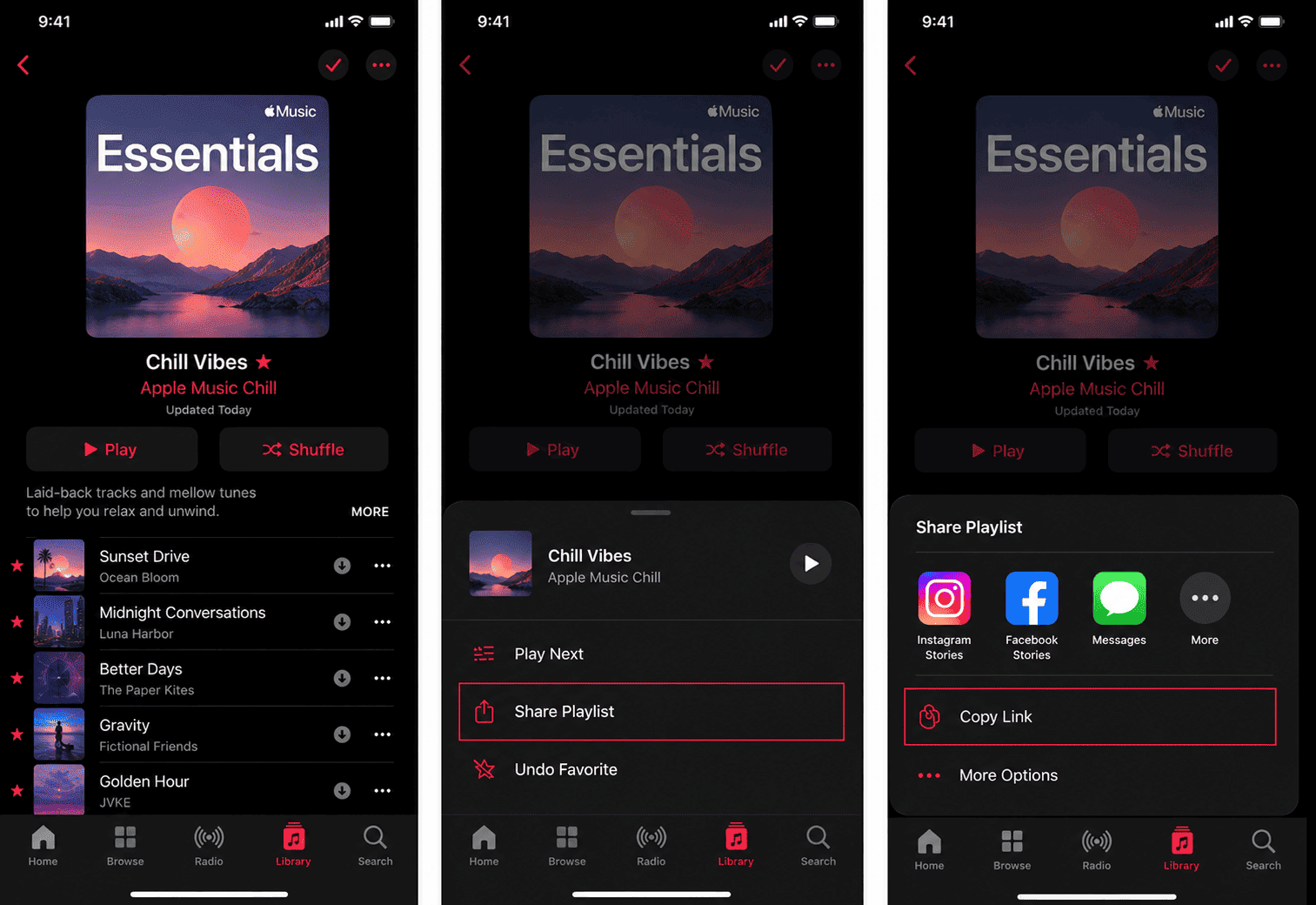
Open the Apple Music app, tap the Three Dots icon, select Share, and copy the Apple Music URL.
APLDownloader is an online Apple Music Downloader that allows users to download Apple Music songs, playlists, albums, and tracks in MP3 format for free. No matter which device you use, APLDownloader works on mobile phones, tablets, laptops, PCs, and desktop computers without software or browser extensions.
APLDownloader is simple to use, which makes it easy to convert Apple Music to MP3 by copying and pasting the Apple Music link into the downloader. The main goal of this website is to provide a clean and user-friendly downloading experience for quick and easy Apple Music downloads online.
The Apple Music to MP3 converter supports songs, playlists, album downloads, and ZIP downloads for larger music collections. Whether you want to save a single track, use the Apple Music playlist downloader, or build your offline music library, APLDownloader helps convert Apple Music songs into high-quality 320kbps MP3 files directly from the browser.
The downloader works smoothly on popular browsers including Google Chrome, Safari, Mozilla Firefox, Microsoft Edge, Opera, and Brave Browser. It is also optimized for Windows, Mac OS, Linux, Android, iPhone, and tablets.
APLDownloader is an online Apple Music to MP3 converter and music downloader that helps users download Apple Music songs, playlists, albums, and tracks directly from their browser. Users only need to copy the Apple Music track link, paste it into the downloader input field, and click the Download button to generate downloadable MP3 files.
The downloader supports playlist downloads, album downloads, and ZIP downloads for larger music collections. APLDownloader is designed to work smoothly across different devices and operating systems, making it accessible for both desktop and mobile users.
Since APLDownloader is browser-based, users do not need apps, APK files, desktop software, or browser extensions. Everything works online using a simple interface designed for fast navigation and easy music downloading.
The downloader is also compatible with most modern browsers and devices, making music downloads simple without complicated setup steps.
Downloading Apple Music songs using APLDownloader is quick and simple. The downloader is designed to convert Apple Music links into MP3 files without requiring technical knowledge or additional software.
First, open Apple Music and copy the song, album, or playlist link you want to download. Paste the copied URL into the downloader input field and click the Download button. APLDownloader will process the music link and generate downloadable MP3 files.
For larger playlists and albums, the downloader may also provide ZIP downloads to make downloading multiple songs easier. The process works on phones, tablets, laptops, and desktop computers using any modern browser.
APLDownloader focuses on providing a smooth downloading experience with simple navigation and fast processing.
Fast Apple Music to MP3 Conversion: APLDownloader processes Apple Music URLs quickly and converts tracks into downloadable MP3 files in just a few moments.
Download Songs, Albums, and Playlists: The downloader supports individual songs, complete albums, and Apple Music playlists, making it easy to save music content from Apple Music.
High-Quality 320kbps MP3 Downloads: APLDownloader is optimized to provide high-quality MP3 downloads with smooth playback and better audio quality across devices and music players. The downloader helps users convert Apple Music songs, playlists, and albums into 320kbps MP3 files for offline listening.
ZIP Download Support: Multiple tracks can be downloaded together using ZIP downloads for playlists and albums.
Browser-Based Downloader: Everything works directly inside your browser without requiring software installation or browser extensions.
High Compatibility: APLDownloader works on Windows, Mac OS, Linux, Android, iPhone, tablets, and desktop browsers.
Cross-Browser Support: The downloader supports Google Chrome, Safari, Mozilla Firefox, Microsoft Edge, Opera, and Brave Browser.
Simple User Experience: The downloader interface is clean and easy to use. Users only need to paste the Apple Music URL and click Download.
APLDownloader works fully online, so there is no need to install apps, music converters, or desktop software.
Simply copy and paste the Apple Music link to quickly download songs, playlists, and albums.
The downloader is optimized for phones, tablets, laptops, and desktop computers.
APLDownloader supports both playlist downloads and album downloads, including ZIP downloads for larger collections.
An offline music library can be created using downloaded MP3 files compatible with most music players, mobile phones, tablets, and desktop devices.
Unlike many music downloader websites with confusing buttons and redirects, APLDownloader focuses on a cleaner downloading experience.
Many online music downloader websites can feel slow, confusing, or overloaded with ads and redirects. APLDownloader is designed to provide a simpler and smoother experience for users who want to convert Apple Music to MP3 online.
The downloader supports songs, playlists, albums, MP3 downloads, and ZIP downloads while keeping the downloading process easy to follow. Simply paste the Apple Music URL into the downloader input field and start the conversion process instantly. The downloader can be accessed from almost any device or browser without creating an account or installing software.
APLDownloader is built for users who want a reliable Apple Music Downloader with simple navigation, fast processing, and broad compatibility across devices and operating systems.
Yes. APLDownloader is completely free to use and works directly online without requiring software installation or account registration. Apple Music songs, playlists, and albums can be downloaded without installing apps, browser extensions, or creating an account.
APLDownloader focuses on fast processing, clean navigation, and a smoother downloading experience compared to many online music downloader websites filled with redirects and confusing download buttons. The downloader supports playlist downloads, album downloads, ZIP downloads, and high-quality 320kbps MP3 conversion directly from the browser.
Open Apple Music, copy the song, playlist, or album link, and paste it into the APLDownloader input field. Click the Download button and wait for the Apple Music to MP3 converter to process the music URL and generate downloadable files.
APLDownloader is an online Apple Music to MP3 converter and music downloader designed for saving Apple Music songs, playlists, albums, and tracks directly from the browser. The downloader processes Apple Music track links and converts them into downloadable MP3 files compatible with most devices and music players.
APLDownloader works on most modern devices, including Android phones, iPhones, tablets, Windows PCs, Mac computers, Linux systems, and desktop browsers. As long as your device has an internet connection and a browser, you can use the downloader.
APLDownloader supports downloading Apple Music songs, playlists, albums, and music tracks. The downloader also supports ZIP downloads for larger playlists and album collections.
No. APLDownloader works fully online and does not require software installation, apps, browser extensions, or account registration.
APLDownloader is optimized for fast music processing and quick MP3 generation. Download speed may vary depending on the Apple Music link, playlist size, internet connection, and server load.
APLDownloader is optimized to provide high-quality 320kbps MP3 downloads for Apple Music songs, playlists, and albums whenever available.
This website is not affiliated with or endorsed by Apple Inc. or Apple Music. All trademarks and copyrights belong to their respective owners. The use of the Apple Music name is for descriptive purposes only.
© 2026 APLDownloader